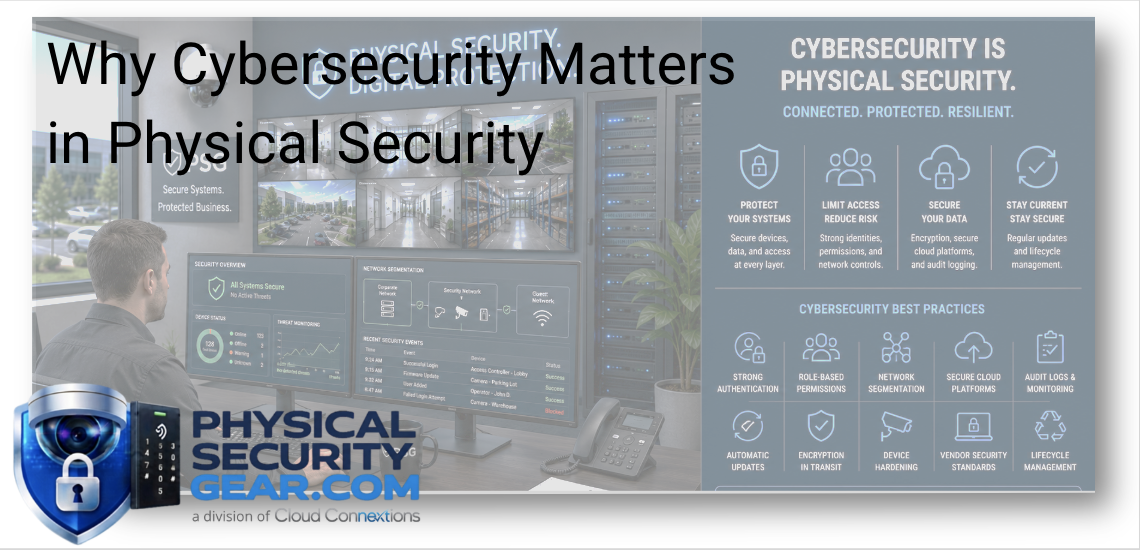
Why Cybersecurity Matters in Physical Security
Posted by Doug Beck: Physical Security Gear on 9/11/2026
What I Would Want to Know Before Connecting Cameras, Access Control, Alarms, and Other Security Devices to Your Network
Written by Doug Beck
When most people start researching physical security, they naturally focus on the equipment.
Which camera has the right resolution?
Which access-control system works for our doors?
Do we need intrusion detection?
What should we use for visitor management?
Those are important questions.
But there is another conversation I would want happening before any of that equipment is installed:
How is all of this going to connect to, communicate with, and be managed inside your technology environment?
Modern physical security is increasingly network-connected technology.
Cameras, readers, controllers, alarms, intercoms, visitor systems, and other devices may communicate with cloud platforms, mobile applications, corporate networks, identity systems, and each other.
That connectivity can make a security system much easier to manage and scale.
It also means cybersecurity needs to be part of the purchasing decision.
I Would Bring IT Into the Conversation Early
One of the first things I would want to understand is who will actually own the system after installation.
Security may use it every day.
Facilities may control doors and visitor workflows.
IT may manage the network, identities, devices, and cybersecurity policies behind it.
If those teams are not talking until installation day, you are already making the project harder than it needs to be.
Before selecting a platform, I would ask:
- Who will administer it?
- Who manages network access?
- Who creates and removes users?
- Who owns firmware and software updates?
- Who responds when a device stops communicating?
- Who reviews security alerts?
- Who will still own this system five years from now?
Those questions may sound operational, but they can have a major impact on which products actually fit the organization.
Field Note: A Great Product Can Still Be the Wrong Product
This is something I think buyers sometimes miss.
A camera can have incredible image quality.
An access-control platform can have impressive features.
An alarm system can offer advanced detection.
But if the system does not fit the organization's IT requirements, administrative model, or long-term support strategy, those features may not matter very much.
I would rather select a platform that the organization can confidently operate for years than choose something based only on the longest feature list.
That is why cybersecurity should be part of the comparison from the beginning.
Cameras Are Now Part of the Technology Environment
Commercial cameras are no longer just devices that record video to a box in a closet.
Depending on the platform and model, they may support:
- Remote management
- Video search
- People and vehicle detection
- License plate recognition
- Event alerts
- Analytics
- Cloud connectivity
- Integration with other physical-security systems
That changes the buying conversation.
I would absolutely ask about resolution, field of view, low-light performance, and camera coverage.
But I would also want to know:
How is the camera updated?
Who can access it?
How is video managed?
What happens when the product reaches end of support?
Can we manage 50 of these as easily as five?
Those questions become especially important when the organization has multiple locations.
If you are evaluating new or replacement cameras, explore our Video Security solutions to compare current options for indoor, outdoor, perimeter, parking, and specialty applications.
Access Control Deserves the Same Conversation
Access control is another area where the technology has evolved considerably.
Today, a system may include:
- Controllers
- Door readers
- Cards or mobile credentials
- Wireless locks
- Cloud administration
- User provisioning
- Video integration
- Multi-location management
You can explore commercial Access Control solutions including controllers, credentials, readers, and wireless locks.
When I am thinking about an access-control system, I am not only thinking about whether the door unlocks.
I also want to understand:
- Who can grant access?
- Who can change permissions?
- How quickly can access be removed?
- Can administrators be limited to certain facilities?
- How are credentials managed?
- What happens when an employee leaves?
- Can the platform fit the organization's identity and IT environment?
The easier a system is to administer correctly, the less likely employees are to create workarounds later.
Best Practice: Think About Offboarding Before Onboarding
Most organizations spend a lot of time thinking about how someone gets access.
I would also ask:
How does that access disappear?
An employee leaves.
A contractor finishes the project.
A temporary administrator no longer needs elevated permissions.
How quickly can those privileges be removed?
Who is responsible for doing it?
Can the organization see who still has access?
This applies to doors, cameras, cloud portals, administrative accounts, and other connected systems.
Offboarding is one of those things that feels secondary until somebody still has access who should not.
Alarms and Intrusion Systems Are Connected Too
The cybersecurity conversation does not stop with cameras and access control.
Modern Alarm and Intrusion solutions may include:
- Basic intrusion detection
- Advanced intrusion
- Perimeter detection
- Connected sensors
- Alarm hubs
- Remote administration
- Mobile notifications
The more these systems communicate with other technology, the more important it becomes to understand how that communication is handled.
Again, I would not start by assuming connected technology is inherently risky.
The question is whether the system is being selected and managed thoughtfully.
Workplace Safety Technology Expands the Picture
Physical security now reaches into areas that were not traditionally considered part of the same system.
That can include:
- Employee-safety tools
- Guest check-in
- Visitor management
- Intercom
- Announcements
- Mailroom and package workflows
Our Workplace Safety solutions include Employee Safety, Guest & Check-In, Intercom & Announcements, and Mailroom applications.
These systems can involve people, identities, building access, communications, and other business information.
That makes administration just as important as the hardware itself.
Cybersecurity Starts Before the Purchase Order
I would not treat cybersecurity as something IT handles after the installer leaves.
Some of the most important decisions are already being made when you choose the platform.
Here are a few things I would want answered before ordering.
Where Does the Data Live?
Is video or system data stored:
- Locally?
- In the cloud?
- In both?
The answer may affect networking, retention, bandwidth, administration, and internal security requirements.
How Do Administrators Sign In?
What authentication options are available?
Can administrator access be protected appropriately?
Can Permissions Be Limited?
Not everyone needs control of everything.
A regional administrator responsible for one facility may not need access to every camera and door across the organization.
The ability to assign appropriate permissions matters.
How Are Updates Handled?
This is a big one.
Does someone need to manually update every device?
Can firmware be managed centrally?
How does the manufacturer communicate important updates?
The answer gets more important as the number of devices grows.
One Device Is Different From 500 Devices
If you have four cameras in one office, device management may feel fairly simple.
If you have hundreds of cameras, readers, controllers, and sensors distributed across multiple locations, the operational burden changes significantly.
At that point, I would be thinking about:
- Centralized management
- Firmware consistency
- Administrative roles
- Device health
- Multi-site visibility
- Lifecycle status
- Support
- Standardization
The product still matters.
But the platform surrounding the product matters more than it did when you only had one building.
What Happens When the Hardware Gets Old?
This is another area where cybersecurity and lifecycle planning overlap.
An older camera may still provide perfectly acceptable video.
That does not automatically mean I would replace it.
But I would want to know:
- Is it still supported?
- Are firmware updates still available?
- Does it work with the platform we want moving forward?
- Can it still be managed properly?
- Is keeping it adding complexity?
- Does the manufacturer still address vulnerabilities for the device?
That is a much better keep-versus-replace conversation than:
“It's five years old, so throw it away.”
There may be equipment worth keeping.
There may also be equipment that still works physically but no longer fits the organization's long-term technology environment.
Cloud vs. On-Premise Is Not Simply a Security Scorecard
I also would not reduce the cloud-versus-on-premise conversation to:
Which one is more secure?
There are too many variables for that to be useful.
Instead, look at the organization's:
- IT resources
- Network environment
- Administrative model
- Update processes
- Security requirements
- Remote-management needs
- Existing infrastructure
- Number of locations
A traditional architecture may fit one organization extremely well.
A cloud-managed system may be far easier for another.
The right answer is the architecture the organization can secure, administer, maintain, and support consistently.
Field Note: Ask Who Is Maintaining This Five Years From Now
This is one of the questions I think deserves more attention during the sales process.
Everyone is focused on installation day.
I want to know what happens after installation day.
Who notices when a device goes offline?
Who handles the update?
Who calls support?
Who knows when equipment is reaching end-of-life?
Who manages new locations?
Who is watching the overall environment as the system grows?
Those operational questions can be just as important as the initial equipment decision.
Integrations Need to Be Discussed Early
If you know the physical-security environment may eventually connect with:
- Identity systems
- Video
- Access control
- Visitor management
- Intercom
- Alarms
- Multiple facilities
- Other workplace platforms
Bring that up before choosing the product.
It is much easier to plan around future integrations than discover later that the platform you selected cannot support what the organization now wants to accomplish.
You do not need to deploy every integration on day one.
You should understand where the system may need to go.
What I Would Ask Before Buying Connected Security Equipment
If I were sitting down with an organization before a physical-security purchase, these are some of the questions I would want answered:
Who owns the system?
Security, Facilities, IT, or some combination?
Where will the system be managed?
One location or many?
Who needs administrative access?
And who should not have it?
How does the organization handle authentication?
Are there existing IT requirements the platform must meet?
How are devices updated?
Centralized or individually?
What happens when equipment reaches end-of-life?
Is there a lifecycle strategy?
Where is the data stored?
And how does that fit the organization's requirements?
What existing equipment needs to remain?
Do not assume everything needs replacement.
What systems may need to integrate later?
Think beyond today's immediate project.
Who supports it after installation?
This may be one of the most important questions on the list.
The Bottom Line
Modern physical security is no longer a collection of isolated devices hanging on walls and doors.
It is increasingly part of the organization's connected technology environment.
That does not mean buying cameras or access control needs to become complicated.
It means the purchasing conversation should include more than specifications.
I would want to know:
Does the product solve the physical-security problem?
Does the platform fit the IT environment?
Can the organization manage it properly?
Can it be updated and supported?
Can it scale if the organization grows?
If the answer to those questions is yes, you are much closer to choosing technology that will still make sense years after installation.
Know Which Security Area You Need to Upgrade?
Explore:
Not Sure Which Platform Fits Your Environment?
Use the chat on our site and tell us what you are using today, what you are trying to improve, and which systems need to work together.
We can help narrow down the equipment and platform options before you buy.
If the project involves multiple buildings, existing equipment, network requirements, or several connected security systems, tell us that too. Those details may change the recommendation considerably.
Continue Your Research
- Ultimate Guide to Commercial Video Surveillance
- Ultimate Guide to Commercial Access Control
- Cloud Video Recording Explained
- Cloud Access Control Explained
- Can I Reuse My Existing Security Cameras?
- How to Choose the Right Commercial Security Integrator
- 25 Questions Every IT Director Should Ask Before Buying Security Technology